Emphasized a Hundred Times, Remembered Zero: How Claude Code Memory Actually Works
Memory management for coding agents has been in the air on X lately. One tweet that caught my attention was Jason Young on Claude Code’s project-level memory: the agent remembers the decisions you make while designing software, the red lines you draw, what you plan to build next, and what still needs fixing—and argues this might finally give developers a reason to stay loyal to their tools. As it happens, I had just finished reading Claude Code’s memory documentation from end to end, and the replies were full of misconceptions about how the built-in memory actually behaves. The loudest complaint, in one form or another: I’ve hammered our project knowledge into it countless times, and it still does whatever it wants.
Plenty of people try to patch this with memory frameworks: stuff the project docs into a vector database, bolt on retrieval, install a memory plugin—each scheme more elaborate than the last. But before stacking frameworks, a more basic question deserves an answer: how does Claude Code’s built-in memory actually work? Most of the misconceptions trace right back to it.
# Why “a hundred times” doesn’t work
The canonical complaint from those replies: red lines, project knowledge—you’ve emphasized them countless times in conversation, so why does none of it work?
Start with a question back: where did you emphasize them? For most people the answer is in conversation. And conversation has two built-in failure points.
First, conversation is not memory. What you say in a session exists only in that session’s context. When the session ends, it’s archived along with the transcript and cleaned up after a while—but either way, nothing you emphasized gets carried into any memory file automatically. Claude Code’s auto memory does take notes, but its test is “will a future session find this useful”—never “how many times did the user say it.”
Second, even staying in the session doesn’t guarantee survival. A long session triggers compaction, and early conversation gets replaced by a summary. Summaries preserve “what was done”; the red line you repeated early on is easy to dilute, or to lose outright. Your emphasis may not even live to see the end of the session—never mind the next one.
Both problems have the same direct fix: instead of emphasizing, give an explicit instruction. Tell Claude Code “remember that we use pnpm, never npm,” and it writes that into auto memory, ready for every later session. Tell it “add this to CLAUDE.md,” and it goes into the rules file. The two destinations are deliberately separate: CLAUDE.md gives Claude persistent project context and instructions; auto memory is the notes Claude keeps for itself from your corrections and preferences. For red lines—things that must hold over the long run—the right home is CLAUDE.md: it loads at the start of every session and is re-injected after compaction, depending on nothing you repeat. One explicit instruction beats a hundred emphases.
# What Claude Code’s memory actually is
CLAUDE.md first. The official docs give its role in one sentence:
CLAUDE.md files give Claude persistent project context and instructions.
It’s a plain markdown file, but everything about it—what to write, where to put it, who it serves—is a matter of mechanics. In the repository root, it’s project-level: committed to git, shared by the whole team. In your home directory, it’s user-level: yours alone, in effect for every project. In the managed policy location your organization deploys, it’s organization-level: loaded for everyone, and individuals can’t opt out. The levels don’t override one another—all of them load at the start of a session, joining the system prompt, the tool definitions, and the skill list to make up the opening context. Memory files are concatenated in order—organization, then user, then project—with the auto-memory index at the end. After compaction, every one of them is injected again from disk.
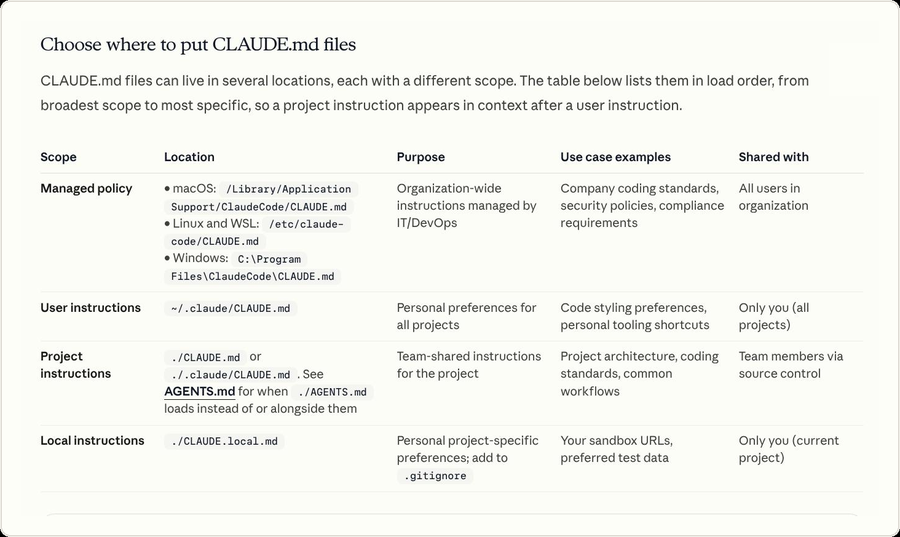
They can also live deeper in the tree. A CLAUDE.md in some subdirectory isn’t loaded at session start—it loads the first time Claude reads or edits a file in that directory. That’s the place for conventions that only apply to one module: you don’t repeat yourself, and it doesn’t forget.
Which answers the first section’s question: why do red lines and project knowledge belong in CLAUDE.md? Because conversation was never a storage medium—and CLAUDE.md has every property the job requires:
- Persistent—a file on disk, outliving every session.
- Automatic—loaded at the start of each session, no repetition needed.
- Compaction-proof—re-injected from disk after compaction instead of being summarized away like early conversation.
A hundred emphases fail not because you didn’t emphasize enough, but because you emphasized in the wrong place.
Still, CLAUDE.md has one natural boundary: it can only contain what you thought to write down. The project memory in that tweet—design decisions already made, the plan for what comes next, the bugs waiting to be fixed—nobody sits down and writes those into a document one by one. Claude picks them up while you work together, and they belong to a second system. Half the complaints in those replies come from never separating the two: what belongs in CLAUDE.md, and what’s better left for Claude to remember itself. And drawing that line starts from a more basic concept: context.
# What a context window is
The official docs have one sentence that is the foundation of the whole memory system:
Each Claude Code session begins with a fresh context window.
And what is a context window? The docs define it:
The context window holds everything Claude knows about your session: your instructions, the files it reads, its own responses, and content that never appears in your terminal.
Before you type a single character, the opening injection is already in place: the system prompt, the tool definitions, the memory files, the skill list. As the session runs, every line of conversation, every file read, every command output gets appended—files and command output usually being the bulk of it. The model has no memory outside this window: what isn’t in it, as far as it’s concerned, doesn’t exist.
Claude Code ships a /context command that draws the window’s composition. The image below is drawn from its output—a 1M-token window at the start of a real session:
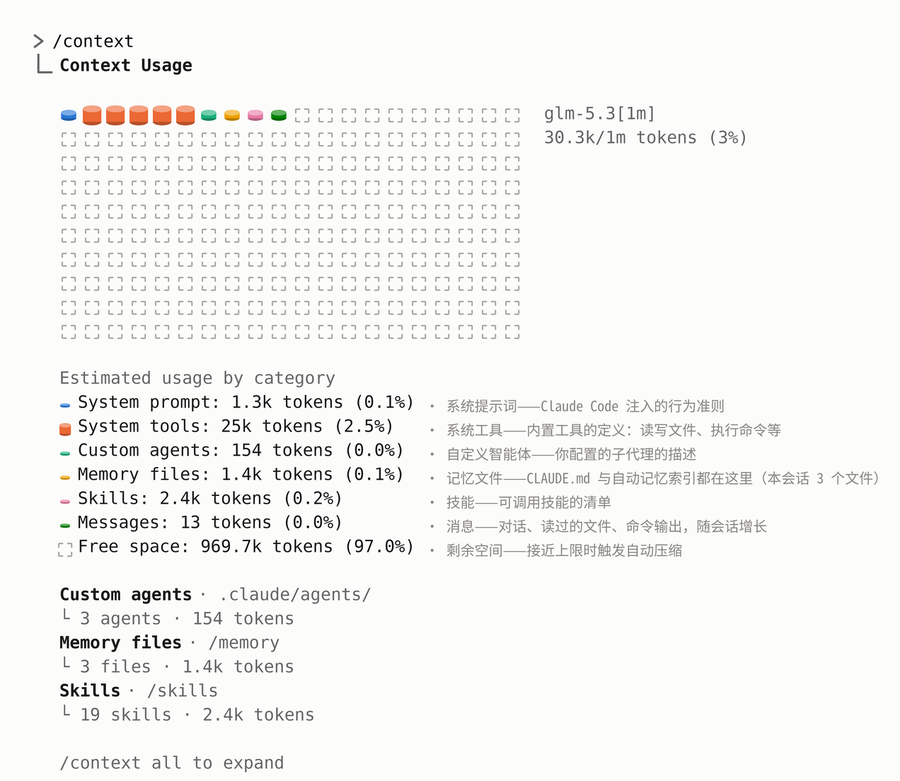
So “it doesn’t remember” isn’t really a model problem. It’s the context window’s two natures.
It ends. When the session ends, the window is archived with everything in it and cleaned up after a while. The only thing a new session starts with is the memory files. What you emphasized lived in exactly one session’s context—that’s why a hundred repetitions carry over exactly zero times.
It fills. The window has a capacity limit. As it nears full, compaction triggers automatically: conversation history is replaced by a summary, and the details are gone for good. The summary keeps “what was done,” not “what you said to do.” Memory files are untouched—after compaction, CLAUDE.md and auto memory are injected again from disk. The same instruction, placed in conversation versus placed in memory, has completely different odds of surviving compaction.
So there is exactly one path for knowledge to cross sessions: be injected into the new window when the next session starts. The two memory systems are really two injection strategies. CLAUDE.md is full-text injection—loaded in full, every session—buying determinism at the cost of holding context budget the whole time. Auto memory is index injection—only the catalog (its first 200 lines) enters the window, and the body is read when Claude judges it relevant—buying capacity for the same budget. What deserves a permanent, full-text residence, and what is better served by an index pulled on demand: that distinction is precisely the line between what you write into CLAUDE.md and what you leave for Claude to remember.
# How auto memory works
The last section called auto memory “index injection.” Now the mechanism itself. The official docs position it like this:
Auto memory lets Claude accumulate knowledge across sessions without you writing anything.
While it works, Claude keeps four kinds of notes for itself, with the type written into each file’s frontmatter:
user—who you are: role, expertise, working preferencesfeedback—corrections you’ve given, and ways of working you’ve confirmedproject—ongoing work, deadlines, and decisions that can’t be derived from the code or the git historyreference—where things outside the project live: the issue tracker, the dashboard
Two kinds of content it deliberately doesn’t record: anything derivable from the codebase itself (architecture, file paths, bugs already fixed), and anything already written in CLAUDE.md. The two systems are built to cooperate here: rules are yours to write, learnings are its to keep, and neither duplicates the other. Nor does it write in every session—the criterion is the one from the first section: will this be useful to a future session? If yes, it records. How many times you emphasized something never enters into it.
“Decides for itself what to remember” doesn’t leave you waiting passively, though. The docs offer the other path: say “remember that we use pnpm, never npm,” or “remember that the API tests depend on a local Redis,” and it saves that into auto memory—which is where the “one explicit instruction” from the first section lands. And an item you explicitly dictate gets exactly the treatment of one it recorded on its own: same four types, same MEMORY.md index, same reading on demand. “Auto” means you don’t have to tend it by default—not that you can’t put your hand in.
Where it lives is equally explicit: one memory directory per project (~/.claude/projects/<project>/memory/), divided by git repository—every worktree and every subdirectory of the same repo shares one copy. That sharing scope is a different thing entirely from CLAUDE.md’s: CLAUDE.md is committed to the repo and shared by the whole team; auto memory is machine-local, never synced across machines—on this machine, it’s yours. Inside the directory: a MEMORY.md index plus a set of topic files, one memory per file.
Only the index is injected at session start: the first 200 lines of MEMORY.md, or its first 25KB, whichever comes first. That’s why the index is held to one line per memory—details go into the topic files, stale entries get merged or deleted—and anything past the limit is simply dropped at the next load. The topic files aren’t loaded at startup at all; Claude reads one with ordinary file tools when it judges the memory relevant to the task at hand. Last section’s “index injection,” in implementation: the catalog stays resident in the window, the body is fetched on demand. When you occasionally see “Saved 2 memories” or “Recalled 2 memories” in the interface—that is this directory being read and written.
This very article is a working example. At some point I corrected the agent on what I want from these posts: explain mechanisms and behavior, not catalogs of configuration options. The correction is in this project’s auto memory today—type feedback—one line in the index:
- [articles-concepts-over-config-knobs](articles-concepts-over-config-knobs.md) — Articles explain mechanisms and behavior, not config catalogs
Every writing session since—this one included—has opened with that line in its context, and I have never stated the preference twice. The complaint in the first section was “a hundred times doesn’t work.” This is the same mechanism, working exactly as designed: whether something gets remembered was never decided by repetition, only by whether a future session will find it useful.
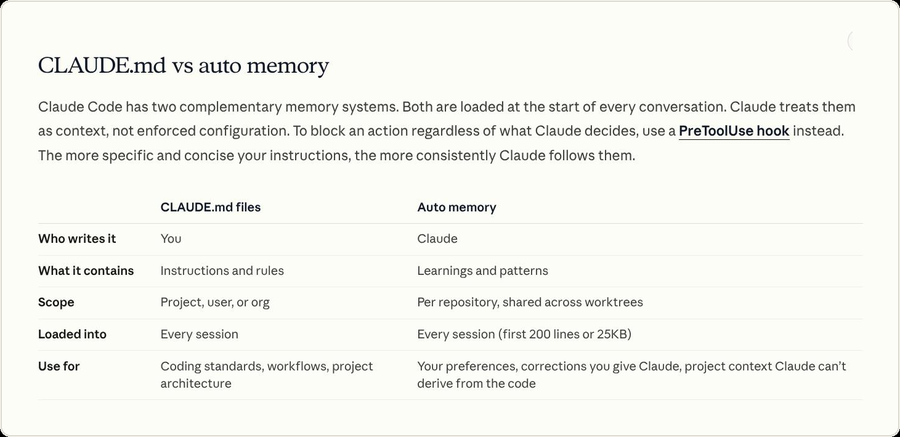
With both systems on the table, the line promised two sections ago can finally be drawn. The official comparison puts it most directly: CLAUDE.md is written by you and holds instructions and rules; auto memory is written by Claude and holds the patterns and experience it has learned. Follow that split and everything falls into place: red lines, coding standards, conventions that every session must honor—into CLAUDE.md, resident in full, buying determinism. Your preferences, your corrections, project background that can’t be found in the code—leave to auto memory, indexed and fetched on demand, saving the resident cost. You write the instructions; it remembers the experience.
# Remembering isn’t obeying
At this point the first misconception is dismantled: emphasized doesn’t mean remembered—what gets recorded, and where, is a matter of mechanics. But there is a second misconception, buried deeper: does remembered mean obeyed?
The red lines are in CLAUDE.md, the corrections are in auto memory, everything loads at startup and comes back after compaction—foolproof, it would seem. The official docs are more honest about what this buys:
Claude treats them as context, not enforced configuration.
The two memory systems and the conversation are, at bottom, the same kind of thing: content in a context window. For CLAUDE.md specifically, the official troubleshooting guide explains how it gets in: the content enters the window as a user message, after the system prompt—not as part of the system prompt. It travels the same channel as the messages you type; the only difference is that it shows up at the start of every session. Claude reads it and does its best to comply, but strict compliance is not guaranteed—least of all when instructions are vague or conflict with each other.
So before concluding “it’s ignoring me,” rule out the ordinary causes. The troubleshooting guide’s common ones, each checkable against that composition diagram from the context-window section:
- Never loaded at all. Open
/contextand check the Memory files column: is the file actually listed? If it isn’t, Claude can’t see it, and obeying is off the table. A subdirectory CLAUDE.md won’t appear in this column—it loads on demand. Don’t misdiagnose that one. - Instructions too vague. “Keep the code well formatted” loses to “use two-space indentation.” An instruction should be specific enough to verify.
- Rules fighting each other. When two files say different things about the same subject, Claude may follow either one. The more levels you have, and the older they get, the closer this is to inevitable.
The remedy for the latter two is an audit. On the auto memory side, everything is plaintext: /memory opens the memory directory, and every entry is a plain markdown file—readable, editable, deletable. Whatever it noted down behind your back is one glance away. On the CLAUDE.md side, there’s /doctor prompt-audit: Claude checks your instruction files—instructions written for older models, references to files or commands that no longer exist, rules that contradict each other—and hands you a report with suggested edits. It won’t change a word unless you tell it to.
And when a rule calls for more than “very probably followed”—when it must execute, no negotiation, like tests passing before every commit—the docs’ answer is no longer memory. It’s a hook:
Hooks execute as shell commands at fixed lifecycle events and apply regardless of what Claude decides to do.
A hook is a shell command bound to a fixed lifecycle event; whatever Claude decides, it runs. With that, the division of labor is complete: knowledge goes to memory, buying probable compliance; enforcement goes to hooks, buying guaranteed execution. You write the instructions; it remembers the experience; hooks do the enforcing.
# Back to that tweet
Which brings us back to the tweet this started with. The project-level memory it lists—design decisions, plans for what’s next, issues waiting to be fixed—is exactly the body of a project-type auto memory. The red lines it mentions belong in CLAUDE.md. One is written by you and resident in full; the other is recorded by Claude and fetched through an index.
And the vector databases, bolt-on retrieval, and memory plugins from the opening? They solve a different problem: knowledge too voluminous for any window, the kind that genuinely needs retrieval. Get the built-in system right first—for most projects, it’s enough—and when it isn’t, bolt on.
The whole article’s answer fits in one line: don’t emphasize a hundred times—put the words in the right place. Rules that must hold over the long run go into CLAUDE.md. Corrections and preferences you want kept get one explicit “remember this.” Constraints that must execute go to hooks. You write the instructions; it remembers the experience; hooks do the enforcing.
As for the title’s complaint—emphasized a hundred times, remembered zero—the answer was written in the first section all along: it was never too little emphasis. It was emphasis in the wrong place.